> For the complete documentation index, see [llms.txt](https://documentation.opencollective.com/llms.txt). Markdown versions of documentation pages are available by appending `.md` to page URLs; this page is available as [Markdown](https://documentation.opencollective.com/giving-to-collectives/platform-tips.md).
# Platform Tips
When you make a contribution to a Collective, you are also invited to add a platform tip. Read on to find out who this tip goes to, and what it is spent on.
When you are making a [contribution to a collective](/giving-to-collectives/contributing.md), you will also be asked if you want to add a platform tip. This is totally optional, and the amount can be changed to any amount you wish.
#### What is a platform tip?
A platform tip is a voluntary payment to support the Open Collective platform. It is separate from your contribution to the collective — only the amount you designate for the collective counts as your contribution.
By adding a platform tip, you’re helping us keep the platform running smoothly and enabling us to add new features.
#### Where is my platform tip going?
When you add a platform tip, you are paying the platform operator (OFiTech) in addition to your chosen collective. Your fiscal host collects the tip on the platform’s behalf and remits it separately from collective funds.
The Open Collective platform remains sustainable due to our investors and the platform fees from hosts. [You can find out more about our pricing here](/why-open-collective/pricing.md).
However, your optional platform tips also play a huge role in helping us to maintain and improve the platform.
{% hint style="info" %}
Platform tips are receipted separately from your contribution to a collective. A tip receipt indicates that the payment went to the platform and is not a charitable contribution to the host or collective.
{% endhint %}
#### Adding a platform tip
Click on any Collective, and access the “contribute” option in the menu. You will then see a range of ways you can support. Select the applicable option and you will be taken to the “contribute to…” page.
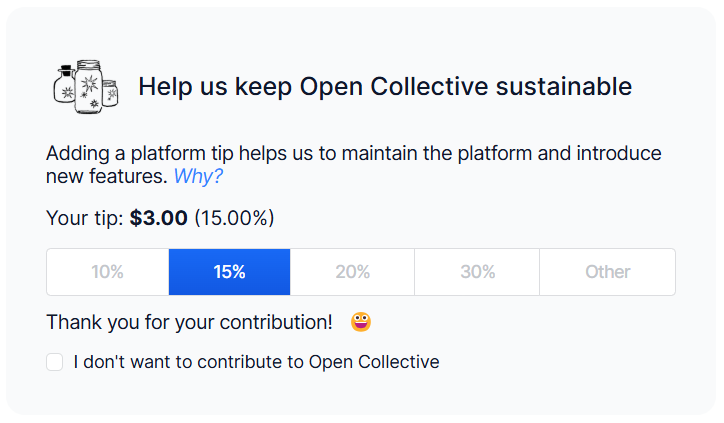
Once you have set the level and frequency of your donation, you will be able to edit your platform tip by adjusting the tip settings.
Default platform tip settings when making a new contribution.
There are four ways to set your platform tip total:
* Keep the platform tip at the default amount
* Adjust the slider to your chosen total
* Select your currency, and type in your amount in the box
* Add a tip which is a percentage of your contribution
Remember to check your total to ensure that you are happy with your tip amount. You can change your tip at any point up until you complete your payment.
#### Updating your platform tip on a recurring contribution
If you already have an active recurring contribution, you can change your platform tip without canceling and re-creating the contribution.
1. Go to **Dashboard > Contributions**.
2. Use the account switcher to select the profile that made the payment.
3. Open the recurring contribution you want to update.
4. Choose **Update platform tip amount**.
You can set the tip to a preset percentage, adjust the slider, or enter a custom amount—including $0 to remove the tip. The new tip amount applies to future charges.
{% hint style="info" %}
Platform tip updates are only available for active recurring contributions where tips are enabled. One-time contributions and some payment methods (such as ACH and SEPA) do not support changes after checkout. See [Making a Recurring Contribution](/giving-to-collectives/making-a-recurring-contribution.md) for details on managing recurring payments.
{% endhint %}
#### Giving directly to the platform
If you want to support the platform without making a contribution to a collective, you can give directly to Open Collective by searching for it in the collectives directory and making a contribution as normal.
[You can find Open Collective and arrange a one-off or recurring contribution here](https://opencollective.com/opencollective)
---
# Agent Instructions
This documentation is published with GitBook. GitBook is the documentation platform designed so that both humans and AI agents can read, navigate, and reason over technical content effectively. Learn more at gitbook.com.
## Querying This Documentation
If you need additional information that is not directly available in this page, you can query the documentation dynamically by asking a question.
Perform an HTTP GET request on the current page URL with the `ask` query parameter, and the optional `goal` query parameter:
```
GET https://documentation.opencollective.com/giving-to-collectives/platform-tips.md?ask=&goal=
```
`ask` is the immediate question: it should be specific, self-contained, and written in natural language.
`goal` is optional and describes the broader end goal you are ultimately trying to accomplish on behalf of the user. GitBook uses it to tailor the answer towards what is most useful for that goal.
The response will contain a direct answer to the question and relevant excerpts and sources from the documentation.
Use this mechanism when the answer is not explicitly present in the current page, you need clarification or additional context, or you want to retrieve related documentation sections.